 Chris Coutinho
cb39b3fca4
Chris Coutinho
cb39b3fca4
Enable users to tune document chunking parameters to match their embedding
model and content type by adding DOCUMENT_CHUNK_SIZE and DOCUMENT_CHUNK_OVERLAP
environment variables.

- **config.py**: Added `document_chunk_size` (default: 512) and
  `document_chunk_overlap` (default: 50) configuration fields with validation:
  - Ensures overlap < chunk_size
  - Warns if chunk_size < 100 words
  - Prevents negative overlap values

- **processor.py**: Updated DocumentChunker instantiation to use config
  settings instead of hardcoded values (line 174-177)

- **tests/unit/test_config.py**: Added TestChunkConfigValidation class with
  9 tests covering:
  - Default values
  - Valid configurations
  - Validation errors (overlap >= chunk_size, negative overlap)
  - Warning for small chunk sizes
  - Environment variable loading

- **docs/configuration.md**: Added comprehensive "Document Chunking
  Configuration" section with:
  - Chunk size selection guidance (256-384 vs 512 vs 768-1024 words)
  - Overlap recommendations (10-20% of chunk size)
  - Configuration examples for different use cases
  - Added env vars to reference table

- **docs/semantic-search-architecture.md**: Added "Document Chunking Strategy"
  section with:
  - Chunking process explanation
  - Example showing sliding window behavior
  - Search behavior with chunks
  - Tuning recommendations

- **env.sample**: Added complete "Semantic Search & Vector Sync Configuration"
  section with:
  - Vector sync settings
  - Qdrant configuration (3 modes)
  - Ollama embedding service
  - Document chunking configuration

- **docker-compose.yml**: Added commented examples for DOCUMENT_CHUNK_SIZE and
  DOCUMENT_CHUNK_OVERLAP with usage notes

\`\`\`bash
DOCUMENT_CHUNK_SIZE=512

DOCUMENT_CHUNK_OVERLAP=50
\`\`\`

1. \`overlap\` must be less than \`chunk_size\`
2. \`overlap\` cannot be negative
3. Warning issued if \`chunk_size\` < 100 words

**Precise matching** (small notes, specific queries):
\`\`\`bash
DOCUMENT_CHUNK_SIZE=256
DOCUMENT_CHUNK_OVERLAP=25
\`\`\`

**Balanced** (default, general purpose):
\`\`\`bash
DOCUMENT_CHUNK_SIZE=512
DOCUMENT_CHUNK_OVERLAP=50
\`\`\`

**Contextual** (long documents, broader topics):
\`\`\`bash
DOCUMENT_CHUNK_SIZE=1024
DOCUMENT_CHUNK_OVERLAP=100
\`\`\`

✅ **User control** - Tune chunking to match embedding model capabilities
✅ **Experimentation** - Test different chunk sizes for optimal results
✅ **Model alignment** - Match chunk size to embedding context window
✅ **Backward compatible** - Defaults maintain existing behavior
✅ **Well validated** - Comprehensive tests prevent misconfiguration

All 22 config validation tests pass (9 new tests for chunking):
- Default values work correctly
- Validation prevents invalid configurations
- Environment variables load properly
- Warning system works as expected

With configurable chunk sizes, users can now experiment with different Ollama
embedding models and tune chunk parameters for optimal semantic search quality.

🤖 Generated with [Claude Code](https://claude.com/claude-code)

Co-Authored-By: Claude <noreply@anthropic.com>
202 lines
9.1 KiB
Markdown
202 lines
9.1 KiB
Markdown
# Nextcloud MCP Server
|
|
|
|
[](https://github.com/cbcoutinho/nextcloud-mcp-server/pkgs/container/nextcloud-mcp-server)
|
|
|
|
**A production-ready MCP server that connects AI assistants to your Nextcloud instance.**
|
|
|
|
Enable Large Language Models like Claude, GPT, and Gemini to interact with your Nextcloud data through a secure API. Create notes, manage calendars, organize contacts, work with files, and more - all through natural language conversations.
|
|
|
|
This is a **dedicated standalone MCP server** designed for external MCP clients like Claude Code and IDEs. It runs independently of Nextcloud (Docker, VM, Kubernetes, or local) and provides deep CRUD operations across Nextcloud apps.
|
|
|
|
> [!NOTE]
|
|
> **Looking for AI features inside Nextcloud?** Nextcloud also provides [Context Agent](https://github.com/nextcloud/context_agent), which powers the Assistant app and runs as an ExApp inside Nextcloud. See [docs/comparison-context-agent.md](docs/comparison-context-agent.md) for a detailed comparison of use cases.
|
|
|
|
## Quick Start
|
|
|
|
Get up and running in 60 seconds using Docker:
|
|
|
|
```bash
|
|
# 1. Create a minimal configuration
|
|
cat > .env << EOF
|
|
NEXTCLOUD_HOST=https://your.nextcloud.instance.com
|
|
NEXTCLOUD_USERNAME=your_username
|
|
NEXTCLOUD_PASSWORD=your_app_password
|
|
EOF
|
|
|
|
# 2. Start the server
|
|
docker run -p 127.0.0.1:8000:8000 --env-file .env --rm \
|
|
ghcr.io/cbcoutinho/nextcloud-mcp-server:latest
|
|
|
|
# 3. Test the connection
|
|
curl http://127.0.0.1:8000/health/ready
|
|
```
|
|
|
|
**Next Steps:**
|
|
- Create an app password in Nextcloud: Settings → Security → Devices & sessions
|
|
- Connect your MCP client (Claude Desktop, IDEs, `mcp dev`, etc.)
|
|
- See [docs/installation.md](docs/installation.md) for other deployment options (local, Kubernetes)
|
|
|
|
## Key Features
|
|
|
|
- **90+ MCP Tools** - Comprehensive API coverage across 8 Nextcloud apps
|
|
- **MCP Resources** - Structured data URIs for browsing Nextcloud data
|
|
- **Semantic Search (Experimental)** - Optional vector-powered search for Notes (requires Qdrant + Ollama)
|
|
- **Document Processing** - OCR and text extraction from PDFs, DOCX, images with progress notifications
|
|
- **Flexible Deployment** - Docker, Kubernetes (Helm), VM, or local installation
|
|
- **Production-Ready Auth** - Basic Auth with app passwords (recommended) or OAuth2/OIDC (experimental)
|
|
- **Multiple Transports** - SSE, HTTP, and streamable-http support
|
|
|
|
## Supported Apps
|
|
|
|
| App | Tools | Capabilities |
|
|
|-----|-------|--------------|
|
|
| **Notes** | 7 | Full CRUD, keyword search, semantic search |
|
|
| **Calendar** | 20+ | Events, todos (tasks), recurring events, attendees, availability |
|
|
| **Contacts** | 8 | Full CardDAV support, address books |
|
|
| **Files (WebDAV)** | 12 | Filesystem access, OCR/document processing |
|
|
| **Deck** | 15 | Boards, stacks, cards, labels, assignments |
|
|
| **Cookbook** | 13 | Recipe management, URL import (schema.org) |
|
|
| **Tables** | 5 | Row operations on Nextcloud Tables |
|
|
| **Sharing** | 10+ | Create and manage shares |
|
|
| **Semantic Search** | 2+ | Vector search for Notes (experimental, opt-in, requires infrastructure) |
|
|
|
|
Want to see another Nextcloud app supported? [Open an issue](https://github.com/cbcoutinho/nextcloud-mcp-server/issues) or contribute a pull request!
|
|
|
|
## Authentication
|
|
|
|
> [!IMPORTANT]
|
|
> **OAuth2/OIDC is experimental** and requires a manual patch to the `user_oidc` app:
|
|
> - **Required patch**: Bearer token support ([issue #1221](https://github.com/nextcloud/user_oidc/issues/1221))
|
|
> - **Impact**: Without the patch, most app-specific APIs fail with 401 errors
|
|
> - **Recommendation**: Use Basic Auth for production until upstream patches are merged
|
|
>
|
|
> See [docs/oauth-upstream-status.md](docs/oauth-upstream-status.md) for patch status and workarounds.
|
|
|
|
**Recommended:** Basic Auth with app-specific passwords provides secure, production-ready authentication. See [docs/authentication.md](docs/authentication.md) for setup details and OAuth configuration.
|
|
|
|
### Authentication Modes
|
|
|
|
The server supports two authentication modes:
|
|
|
|
**Single-User Mode (BasicAuth):**
|
|
- One set of credentials shared by all MCP clients
|
|
- Simple setup: username + app password in environment variables
|
|
- All clients access Nextcloud as the same user
|
|
- Best for: Personal use, development, single-user deployments
|
|
|
|
**Multi-User Mode (OAuth):**
|
|
- Each MCP client authenticates separately with their own Nextcloud account
|
|
- Per-user scopes and permissions (clients only see tools they're authorized for)
|
|
- More secure: tokens expire, credentials never shared with server
|
|
- Best for: Teams, multi-user deployments, production environments with multiple users
|
|
|
|
See [docs/authentication.md](docs/authentication.md) for detailed setup instructions.
|
|
|
|
## Semantic Search
|
|
|
|
The server provides an experimental RAG pipeline to enable _Semantic Search_ that enables MCP clients to find information in Nextcloud based on **meaning** rather than just keywords. Instead of matching "machine learning" only when those exact words appear, it understands that "neural networks," "AI models," and "deep learning" are semantically related concepts.
|
|
|
|
**Example:**
|
|
- **Keyword search**: Query "car" only finds notes containing "car"
|
|
- **Semantic search**: Query "car" also finds notes about "automobile," "vehicle," "sedan," "transportation"
|
|
|
|
This enables natural language queries and helps discover related content across your Nextcloud notes.
|
|
|
|
> [!NOTE]
|
|
> **Semantic Search is experimental and opt-in:**
|
|
> - Disabled by default (`VECTOR_SYNC_ENABLED=false`)
|
|
> - Currently supports Notes app only (multi-app support planned)
|
|
> - Requires additional infrastructure: vector database + embedding service
|
|
> - Answer generation (`nc_semantic_search_answer`) requires MCP client sampling support
|
|
>
|
|
> See [docs/semantic-search-architecture.md](docs/semantic-search-architecture.md) for architecture details and [docs/configuration.md](docs/configuration.md) for setup instructions.
|
|
|
|
## Documentation
|
|
|
|
### Getting Started
|
|
- **[Installation](docs/installation.md)** - Docker, Kubernetes, local, or VM deployment
|
|
- **[Configuration](docs/configuration.md)** - Environment variables and advanced options
|
|
- **[Authentication](docs/authentication.md)** - Basic Auth vs OAuth2/OIDC setup
|
|
- **[Running the Server](docs/running.md)** - Start, manage, and troubleshoot
|
|
|
|
### Features
|
|
- **[App Documentation](docs/)** - Notes, Calendar, Contacts, WebDAV, Deck, Cookbook, Tables
|
|
- **[Document Processing](docs/configuration.md#document-processing)** - OCR and text extraction setup
|
|
- **[Semantic Search Architecture](docs/semantic-search-architecture.md)** - Experimental vector search (Notes only, opt-in)
|
|
|
|
### Advanced Topics
|
|
- **[OAuth Architecture](docs/oauth-architecture.md)** - How OAuth works (experimental)
|
|
- **[OAuth Quick Start](docs/quickstart-oauth.md)** - 5-minute OAuth setup
|
|
- **[OAuth Setup Guide](docs/oauth-setup.md)** - Detailed OAuth configuration
|
|
- **[Troubleshooting](docs/troubleshooting.md)** - Common issues and solutions
|
|
- **[Comparison with Context Agent](docs/comparison-context-agent.md)** - When to use each approach
|
|
|
|
## Examples
|
|
|
|
### Create a Note
|
|
```
|
|
AI: "Create a note called 'Meeting Notes' with today's agenda"
|
|
→ Uses nc_notes_create_note tool
|
|
```
|
|
|
|
### Import Recipes
|
|
```
|
|
AI: "Import the recipe from https://www.example.com/recipe/chocolate-cake"
|
|
→ Uses nc_cookbook_import_recipe tool with schema.org metadata extraction
|
|
```
|
|
|
|
### Schedule Meetings
|
|
```
|
|
AI: "Schedule a team meeting for next Tuesday at 2pm"
|
|
→ Uses nc_calendar_create_event tool
|
|
```
|
|
|
|
### Manage Files
|
|
```
|
|
AI: "Create a folder called 'Project X' and move all PDFs there"
|
|
→ Uses nc_webdav_create_directory and nc_webdav_move tools
|
|
```
|
|
|
|
### Semantic Search (Experimental, Opt-in)
|
|
```
|
|
AI: "Find notes related to machine learning concepts"
|
|
→ Uses nc_semantic_search to find semantically similar notes (requires Qdrant + Ollama setup)
|
|
```
|
|
|
|
**Note:** For AI-generated answers with citations, use `nc_semantic_search_answer` (requires MCP client with sampling support).
|
|
|
|
## Contributing
|
|
|
|
Contributions are welcome!
|
|
|
|
- Report bugs or request features: [GitHub Issues](https://github.com/cbcoutinho/nextcloud-mcp-server/issues)
|
|
- Submit improvements: [Pull Requests](https://github.com/cbcoutinho/nextcloud-mcp-server/pulls)
|
|
- Development guidelines: [CLAUDE.md](CLAUDE.md)
|
|
|
|
## Security
|
|
|
|
[](https://mseep.ai/app/cbcoutinho-nextcloud-mcp-server)
|
|
|
|
This project takes security seriously:
|
|
- Production-ready Basic Auth with app-specific passwords
|
|
- OAuth2/OIDC support (experimental, requires upstream patches)
|
|
- Per-user access tokens
|
|
- No credential storage in OAuth mode
|
|
- Regular security assessments
|
|
|
|
Found a security issue? Please report it privately to the maintainers.
|
|
|
|
## License
|
|
|
|
This project is licensed under the AGPL-3.0 License. See [LICENSE](./LICENSE) for details.
|
|
|
|
## Star History
|
|
|
|
[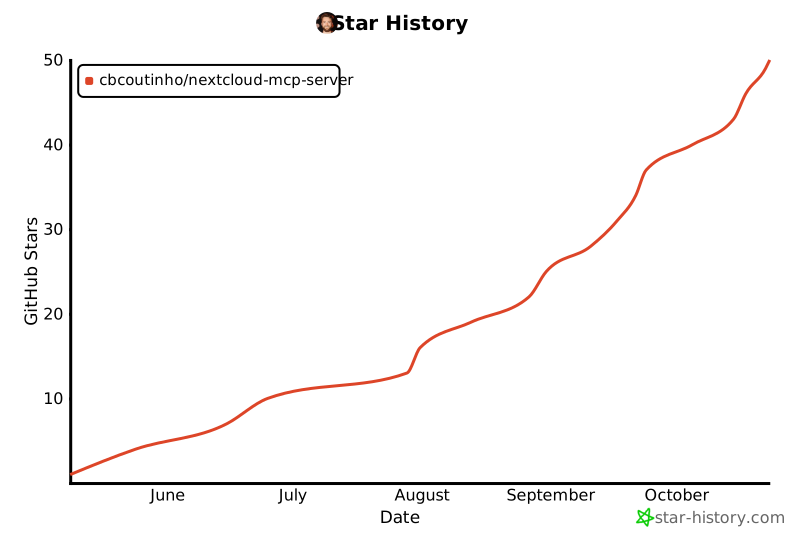](https://www.star-history.com/#cbcoutinho/nextcloud-mcp-server&Date)
|
|
|
|
## References
|
|
|
|
- [Model Context Protocol](https://github.com/modelcontextprotocol)
|
|
- [MCP Python SDK](https://github.com/modelcontextprotocol/python-sdk)
|
|
- [Nextcloud](https://nextcloud.com/)
|