 Chris Coutinho
243 lines
8.2 KiB
Markdown
243 lines
8.2 KiB
Markdown
# Nextcloud MCP Server
|
|
|
|
[](https://github.com/cbcoutinho/nextcloud-mcp-server/pkgs/container/nextcloud-mcp-server)
|
|
|
|
**Enable AI assistants to interact with your Nextcloud instance.**
|
|
|
|
The Nextcloud MCP (Model Context Protocol) server allows Large Language Models like Claude, GPT, and Gemini to interact with your Nextcloud data through a secure API. Create notes, manage calendars, organize contacts, work with files, and more - all through natural language.
|
|
|
|
> [!NOTE]
|
|
> **Nextcloud has two ways to enable AI access:** Nextcloud provides [Context Agent](https://github.com/nextcloud/context_agent), an AI agent backend that powers the [Assistant](https://github.com/nextcloud/assistant) app and allows AI to interact with Nextcloud apps like Calendar, Talk, and Contacts. Context Agent runs as an ExApp inside Nextcloud and also exposes an MCP server endpoint for external LLMs. This project (Nextcloud MCP Server) is a **dedicated standalone MCP server** designed specifically for external MCP clients like Claude Code and IDEs, with deep CRUD operations and OAuth support. See our [detailed comparison](docs/comparison-context-agent.md) to understand which approach fits your use case.
|
|
|
|
## Features
|
|
|
|
### Supported Nextcloud Apps
|
|
|
|
| App | Support | Features |
|
|
|-----|---------|----------|
|
|
| **Notes** | ✅ Full | Create, read, update, delete, search notes. Handle attachments. |
|
|
| **Calendar** | ✅ Full | Manage events, recurring events, reminders, attendees via CalDAV. |
|
|
| **Contacts** | ✅ Full | CRUD operations for contacts and address books via CardDAV. |
|
|
| **Files (WebDAV)** | ✅ Full | Complete file system access - browse, read, write, organize files. |
|
|
| **Deck** | ✅ Full | Project management - boards, stacks, cards, labels, assignments. |
|
|
| **Tables** | ⚠️ Partial | Row-level operations. Table management not yet supported. |
|
|
| **Tasks** | ❌ Planned | [Issue #73](https://github.com/cbcoutinho/nextcloud-mcp-server/issues/73) |
|
|
|
|
Want to see another Nextcloud app supported? [Open an issue](https://github.com/cbcoutinho/nextcloud-mcp-server/issues) or contribute a pull request!
|
|
|
|
### Authentication
|
|
|
|
| Mode | Security | Best For |
|
|
|------|----------|----------|
|
|
| **OAuth2/OIDC** ✅ | 🔒 High | Production, multi-user deployments |
|
|
| **Basic Auth** ⚠️ | Lower | Development, testing |
|
|
|
|
OAuth2/OIDC provides secure, per-user authentication with access tokens. See [Authentication Guide](docs/authentication.md) for details.
|
|
|
|
## Quick Start
|
|
|
|
### 1. Install
|
|
|
|
```bash
|
|
# Clone the repository
|
|
git clone https://github.com/cbcoutinho/nextcloud-mcp-server.git
|
|
cd nextcloud-mcp-server
|
|
|
|
# Install with uv (recommended)
|
|
uv sync
|
|
|
|
# Or using Docker
|
|
docker pull ghcr.io/cbcoutinho/nextcloud-mcp-server:latest
|
|
```
|
|
|
|
See [Installation Guide](docs/installation.md) for detailed instructions.
|
|
|
|
### 2. Configure
|
|
|
|
Create a `.env` file:
|
|
|
|
```bash
|
|
# Copy the sample
|
|
cp env.sample .env
|
|
```
|
|
|
|
**For OAuth (recommended):**
|
|
```dotenv
|
|
NEXTCLOUD_HOST=https://your.nextcloud.instance.com
|
|
```
|
|
|
|
**For Basic Auth:**
|
|
```dotenv
|
|
NEXTCLOUD_HOST=https://your.nextcloud.instance.com
|
|
NEXTCLOUD_USERNAME=your_username
|
|
NEXTCLOUD_PASSWORD=your_app_password
|
|
```
|
|
|
|
See [Configuration Guide](docs/configuration.md) for all options.
|
|
|
|
### 3. Set Up Authentication
|
|
|
|
**OAuth Setup (recommended):**
|
|
1. Install Nextcloud OIDC apps (`oidc` + `user_oidc`)
|
|
2. Enable dynamic client registration
|
|
3. Configure Bearer token validation
|
|
4. Start the server
|
|
|
|
See [OAuth Quick Start](docs/quickstart-oauth.md) for 5-minute setup or [OAuth Setup Guide](docs/oauth-setup.md) for production deployment.
|
|
|
|
### 4. Run the Server
|
|
|
|
```bash
|
|
# Load environment variables
|
|
export $(grep -v '^#' .env | xargs)
|
|
|
|
# Start the server
|
|
uv run nextcloud-mcp-server --oauth
|
|
|
|
# Or with Docker
|
|
docker run -p 127.0.0.1:8000:8000 --env-file .env --rm \
|
|
ghcr.io/cbcoutinho/nextcloud-mcp-server:latest --oauth
|
|
```
|
|
|
|
The server starts on `http://127.0.0.1:8000` by default.
|
|
|
|
See [Running the Server](docs/running.md) for more options.
|
|
|
|
### 5. Connect an MCP Client
|
|
|
|
Test with MCP Inspector:
|
|
|
|
```bash
|
|
uv run mcp dev
|
|
```
|
|
|
|
Or connect from:
|
|
- Claude Desktop
|
|
- Any MCP-compatible client
|
|
|
|
## Documentation
|
|
|
|
### Getting Started
|
|
- **[Installation](docs/installation.md)** - Install the server
|
|
- **[Configuration](docs/configuration.md)** - Environment variables and settings
|
|
- **[Authentication](docs/authentication.md)** - OAuth vs BasicAuth
|
|
- **[Running the Server](docs/running.md)** - Start and manage the server
|
|
|
|
### Architecture
|
|
- **[Comparison with Context Agent](docs/comparison-context-agent.md)** - How this MCP server differs from Nextcloud's Context Agent
|
|
|
|
### OAuth Documentation
|
|
- **[OAuth Quick Start](docs/quickstart-oauth.md)** - 5-minute setup guide
|
|
- **[OAuth Setup Guide](docs/oauth-setup.md)** - Production deployment
|
|
- **[OAuth Architecture](docs/oauth-architecture.md)** - How OAuth works
|
|
- **[OAuth Troubleshooting](docs/oauth-troubleshooting.md)** - OAuth-specific issues
|
|
- **[Upstream Status](docs/oauth-upstream-status.md)** - Required patches and PRs
|
|
|
|
### Reference
|
|
- **[Troubleshooting](docs/troubleshooting.md)** - Common issues and solutions
|
|
|
|
### App-Specific Documentation
|
|
- [Notes API](docs/notes.md)
|
|
- [Calendar (CalDAV)](docs/calendar.md)
|
|
- [Contacts (CardDAV)](docs/contacts.md)
|
|
- [Deck](docs/deck.md)
|
|
- [Tables](docs/table.md)
|
|
- [WebDAV](docs/webdav.md)
|
|
|
|
## MCP Tools & Resources
|
|
|
|
The server exposes Nextcloud functionality through MCP tools (for actions) and resources (for data browsing).
|
|
|
|
### Tools
|
|
Tools enable AI assistants to perform actions:
|
|
- `nc_notes_create_note` - Create a new note
|
|
- `deck_create_card` - Create a Deck card
|
|
- `nc_calendar_create_event` - Create a calendar event
|
|
- `nc_contacts_create_contact` - Create a contact
|
|
- And many more...
|
|
|
|
### Resources
|
|
Resources provide read-only access to Nextcloud data:
|
|
- `nc://capabilities` - Server capabilities
|
|
- `nc://Deck/boards/{board_id}` - Deck board data
|
|
- `notes://settings` - Notes app settings
|
|
- And more...
|
|
|
|
Run `uv run nextcloud-mcp-server --help` to see all available options.
|
|
|
|
## Examples
|
|
|
|
### Create a Note
|
|
```
|
|
AI: "Create a note called 'Meeting Notes' with today's agenda"
|
|
→ Uses nc_notes_create_note tool
|
|
```
|
|
|
|
### Manage Calendar
|
|
```
|
|
AI: "Schedule a team meeting for next Tuesday at 2pm"
|
|
→ Uses nc_calendar_create_event tool
|
|
```
|
|
|
|
### Organize Files
|
|
```
|
|
AI: "Create a folder called 'Project X' and move all PDFs there"
|
|
→ Uses WebDAV tools (nc_webdav_create_directory, nc_webdav_move)
|
|
```
|
|
|
|
### Project Management
|
|
```
|
|
AI: "Create a new Deck board for Q1 planning with Todo, In Progress, and Done stacks"
|
|
→ Uses deck_create_board and deck_create_stack tools
|
|
```
|
|
|
|
## Transport Protocols
|
|
|
|
The server supports multiple MCP transport protocols:
|
|
|
|
- **streamable-http** (recommended) - Modern streaming protocol
|
|
- **sse** (default, deprecated) - Server-Sent Events for backward compatibility
|
|
- **http** - Standard HTTP protocol
|
|
|
|
```bash
|
|
# Use streamable-http (recommended)
|
|
uv run nextcloud-mcp-server --transport streamable-http
|
|
```
|
|
|
|
> [!WARNING]
|
|
> SSE transport is deprecated and will be removed in a future MCP specification version. Please migrate to `streamable-http`.
|
|
|
|
## Contributing
|
|
|
|
Contributions are welcome!
|
|
|
|
- Report bugs or request features: [GitHub Issues](https://github.com/cbcoutinho/nextcloud-mcp-server/issues)
|
|
- Submit improvements: [Pull Requests](https://github.com/cbcoutinho/nextcloud-mcp-server/pulls)
|
|
- Read [CLAUDE.md](CLAUDE.md) for development guidelines
|
|
|
|
## Security
|
|
|
|
[](https://mseep.ai/app/cbcoutinho-nextcloud-mcp-server)
|
|
|
|
This project takes security seriously:
|
|
- OAuth2/OIDC support for secure authentication
|
|
- No credential storage with OAuth mode
|
|
- Per-user access tokens
|
|
- Regular security assessments
|
|
|
|
Found a security issue? Please report it privately to the maintainers.
|
|
|
|
## License
|
|
|
|
This project is licensed under the AGPL-3.0 License. See [LICENSE](./LICENSE) for details.
|
|
|
|
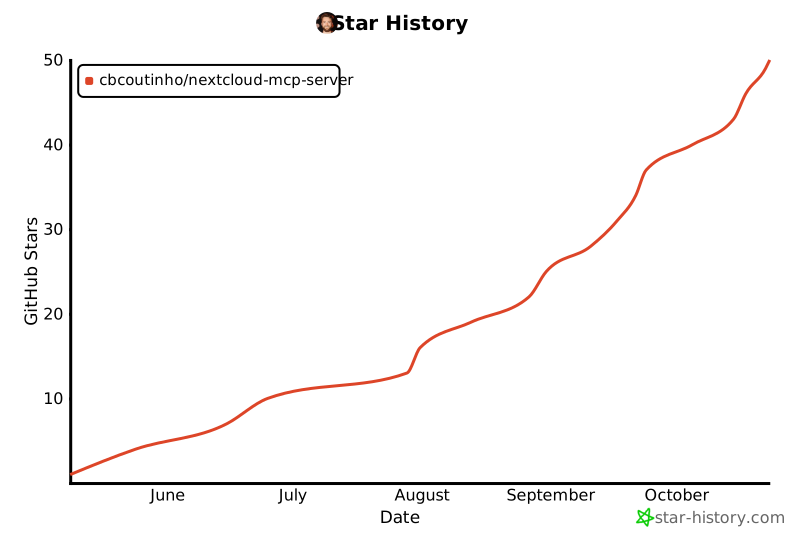
## Star History
|
|
|
|
[](https://www.star-history.com/#cbcoutinho/nextcloud-mcp-server&Date)
|
|
|
|
## References
|
|
|
|
- [Model Context Protocol](https://github.com/modelcontextprotocol)
|
|
- [MCP Python SDK](https://github.com/modelcontextprotocol/python-sdk)
|
|
- [Nextcloud](https://nextcloud.com/)
|